---
title: "How To \"Collapse\" / \"Expand\" The Input Panel For An Estimate"
description: "How To \"Collapse\" / \"Expand\" The Programming Panel For An Estimate"
---
[Skip to content](https://lp.zebel.io/help/how-to-collapse-/-expand-the-programming-panel-for-an-estimate#main-content)
English
Show submenu for translations

Open main navigation
Close main navigation
- English
Show submenu for translations
How can we help you?
- There are no suggestions because the search field is empty.
1. [Zebel Help Center](https://lp.zebel.io/help?hsLang=en)
2. [Estimates](https://lp.zebel.io/help/estimates?hsLang=en)
# How To "Collapse" / "Expand" The Input Panel For An Estimate
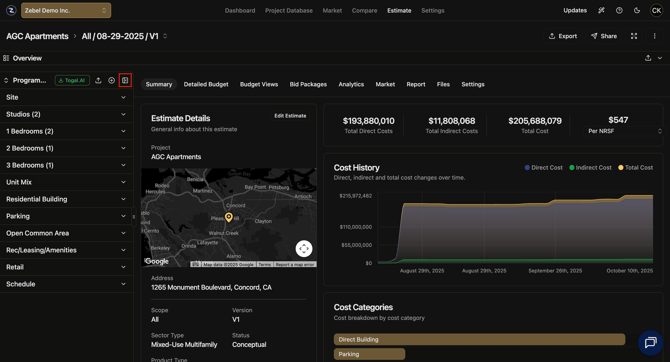
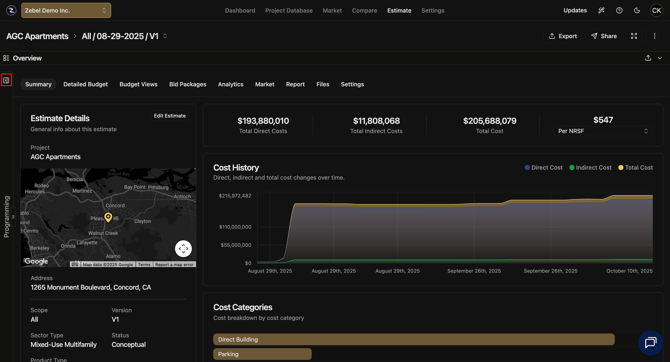
To "**collapse**" / "**expand**" the input panel for an estimate follow these steps.
1\. Go to the desired estimate.
2\. Click on the "**collapse / expand**" icon located on the upper right corner of the input panel. input panel is the vertical inputs area located on the left of the estimate.
3\. You have the option to "**collapse**" if the input panel is expanded or "**expand**" is the input panel is collapsed.
**Screenshots Of Each Example**
****
****
Published 9/23/2025.
- [Getting Started](https://lp.zebel.io/help/getting-started?hsLang=en)
- [Database](https://lp.zebel.io/help/database?hsLang=en)
- [Comparison Reports](https://lp.zebel.io/help/comparison-reports?hsLang=en)
- [Estimates](https://lp.zebel.io/help/estimates?hsLang=en)
- [Account Settings](https://lp.zebel.io/help/account-settings?hsLang=en)
- [Bid Management](https://lp.zebel.io/help/bid-management?hsLang=en)
- [Integrations](https://lp.zebel.io/help/integrations?hsLang=en)
- [Estimate Reports](https://lp.zebel.io/help/estimate-reports?hsLang=en)
- [Value Engineering](https://lp.zebel.io/help/value-engineering?hsLang=en)
[](https://zebel.io/)
[mailto:email@email.com](mailto:email@email.com)
Copyright © 2026, Zebel Group Inc