---
title: "How To \"Sort\" Projects In Database Page"
description: "How To \"Sort\" Projects In Database Page"
---
[Skip to content](https://lp.zebel.io/help/how-to-sort-projects-in-database-page#main-content)
English
Show submenu for translations

Open main navigation
Close main navigation
- English
Show submenu for translations
How can we help you?
- There are no suggestions because the search field is empty.
1. [Zebel Help Center](https://lp.zebel.io/help?hsLang=en)
2. [Database](https://lp.zebel.io/help/database?hsLang=en)
# How To "Sort" Projects In Database Page
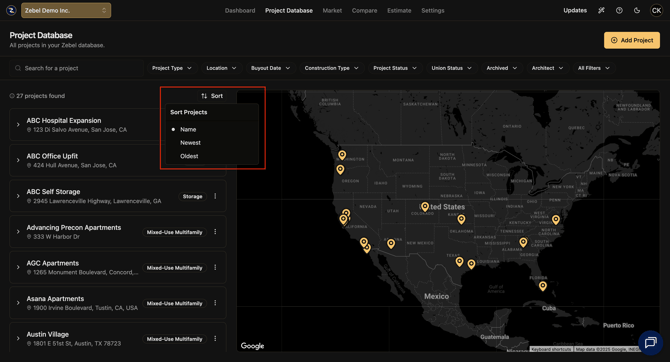
You have the ability to "**Sort**" projects in the "**Project Database**" page by the following criteria.
"**Name**"
"**Newest**"
"**Oldest**"
If you select one of the above options a "**Clear Filters**" button will appear to the left of the "**Sort**" button.
The "**Sort**" button is located on the upper right corner of the left vertical panel in which all the projects are listed.
**Screenshot**
****
Published 9/16/2025.
- [Getting Started](https://lp.zebel.io/help/getting-started?hsLang=en)
- [Database](https://lp.zebel.io/help/database?hsLang=en)
- [Comparison Reports](https://lp.zebel.io/help/comparison-reports?hsLang=en)
- [Estimates](https://lp.zebel.io/help/estimates?hsLang=en)
- [Account Settings](https://lp.zebel.io/help/account-settings?hsLang=en)
- [Bid Management](https://lp.zebel.io/help/bid-management?hsLang=en)
- [Integrations](https://lp.zebel.io/help/integrations?hsLang=en)
- [Estimate Reports](https://lp.zebel.io/help/estimate-reports?hsLang=en)
- [Value Engineering](https://lp.zebel.io/help/value-engineering?hsLang=en)
[](https://zebel.io/)
[mailto:email@email.com](mailto:email@email.com)
Copyright © 2026, Zebel Group Inc