
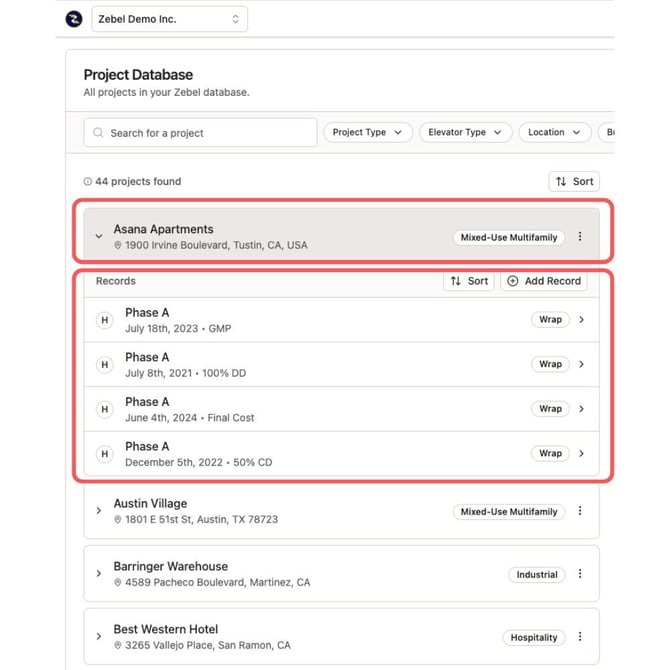
The data is organized in the database through the following objects:
- Project: The project serves as a container for the records associated with it.
- Record: Record is where the actual data about the project is stored. A project can have multiple records, representing different phases of the project (e.g. Building A, Building B, etc.) or different snapshots of the project in. time (e.g. SD Estimate, DD Estimate, GMP, Actual Final Cost). The example above shows Asana Apartment project with 4 records for different stages of the project.
Project Attributes:
- Name
- Address
- Project type (e.g. Multifamily, Industrial, etc.)
Record Attributes:
- Phase: You can use this attribute for different parts of the project (e.g. Building A vs Building B, or Parking Garage vs Site Work vs Residential Building). Use "All" if the record encompasses the entire project.
- Record Date: You can use Record Date for the date the record was uploaded or any other date that works for the user.
- Version: You can use version to document the progression of the project (e.g. SD, DD, CD) or different design scenarios (e.g. Rev 1, Rev 2)
- Buyout Date: Date project was bought out or estimated. This date drives escalation calculations throughout the software.
- Product Type: Each project type (e.g. Multifamily, Industrial) has a list of sub project types, aka product type. Multifamily project could be of any of the following product types: Podium, Wrap, Garden Style, and High-Rise.
- Construction Type: Type I (concrete) , II (steel), III (2 Hr-rated wood-framed), IV, and V (1 Hr-rated wood-framed)
- Union (Yes/No): Shows if the project was built by union or open shop